Why keeping software updated is harder than it looks, and how business leaders can reduce cybersecurity risks through proactive patch management.
Quick Answer: What Is the Patching Problem?
The patching problem occurs when businesses struggle to identify, prioritize, install, and verify software updates across their IT environments. Without consistent patch management, known vulnerabilities can expose organizations to cyberattacks, ransomware, and operational disruptions. A proactive approach combines regular updates, risk-based prioritization, automation, and continuous monitoring to strengthen security and business continuity.
Every business relies on technology to keep operations moving. Employees use computers to communicate with customers, access company files, process transactions, manage schedules, and perform daily responsibilities. Behind these activities are operating systems, applications, servers, network devices, and cloud platforms that require regular updates to remain secure and reliable.
But keeping all these systems updated is easier said than done.
A new software update might seem like a routine IT task. However, businesses must consider compatibility, employee productivity, system downtime, security vulnerabilities, and the possibility that an update could disrupt critical applications. Multiply those considerations across dozens or hundreds of devices, and the process quickly becomes complicated.
This is the patching problem: businesses know they need to update their technology, but they struggle to keep up with the growing number of vulnerabilities, software updates, and systems that require attention.
For business owners, CEOs, COOs, and IT managers, this is more than a technical inconvenience. Delayed patches can expose sensitive information, interrupt business operations, and create opportunities for cybercriminals.
Understanding why patching is difficult is the first step toward building a more proactive cybersecurity strategy. For business leaders, this also means looking beyond routine IT maintenance and understanding how technology decisions affect business performance, security, and long-term growth.
As your Technology Coach and Technology Partner, PCA Technology Solutions helps businesses connect everyday IT management with a broader Strategic Roadmap that supports measurable Business Outcomes and stronger Cyber Resiliency.

Unlock Enterprise Agility with Co-Managed IT
Partner with PCA and empower your internal IT team with the flexibility, expertise, and scalability needed to thrive. Let’s build a smarter, faster, more resilient tech environment together.
What Is the Patching Problem in Business IT?
The patching problem refers to the difficulty organizations face in identifying, prioritizing, testing, and installing software updates across their technology environments in a timely and consistent manner.
A software patch is an update released by a vendor to fix security vulnerabilities, correct software errors, improve performance, or address compatibility issues.
For example, Microsoft may release security updates for Windows and Microsoft 365 applications. Hardware manufacturers may release firmware updates for network equipment. Software developers may issue patches to address weaknesses discovered in their applications.
Each update serves a purpose, but businesses must manage these updates across multiple devices, platforms, and users.
The challenge becomes more significant as technology environments grow.
An organization may have:
- Employee workstations and laptops running different operating system versions.
- Servers hosting business-critical applications and databases.
- Network devices, routers, and firewalls requiring firmware updates.
- Cloud-based applications and productivity platforms.
- Remote employees accessing company resources from different locations.
- Third-party software that requires independent updates.
Without a centralized process, IT teams may struggle to determine which devices need updates, which vulnerabilities require immediate attention, and whether patches have been successfully installed.
According to the National Institute of Standards and Technology (NIST), enterprise patch management involves identifying, prioritizing, acquiring, installing, and verifying patches, updates, and upgrades throughout an organization.
For business leaders, this process is also about accountability. Knowing which systems need updates, understanding the risks involved, and confirming that vulnerabilities have been addressed are essential parts of maintaining a secure and reliable technology environment.
In other words, patching is not simply about clicking an update button. It requires an ongoing process that connects technology maintenance with business risk management.
What Is Daytime Patching and Why Does It Matter?
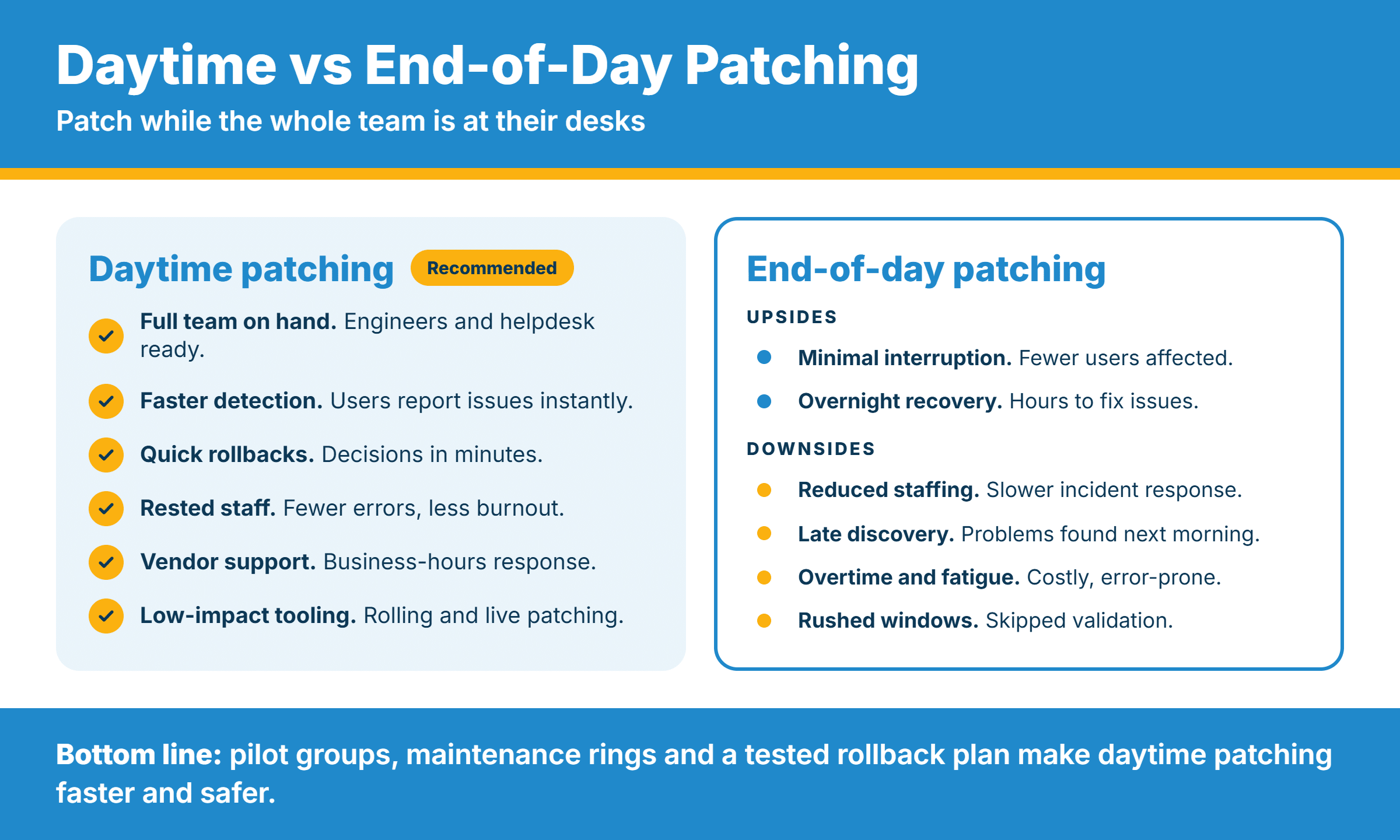
Traditionally, businesses schedule software updates and patch installations after business hours to avoid interrupting employees. However, daytime patching offers an alternative, letting IT teams deploy updates and perform maintenance during regular business hours.
With the right tools, planning, and monitoring, daytime patching can help businesses address vulnerabilities sooner instead of waiting for the next after-hours maintenance window. It can also provide IT teams with better visibility into update progress, allow faster troubleshooting when issues arise, and reduce the need for employees to stay late or wait until the next business day for maintenance to be completed.
At PCA Technology Solutions, we’re adopting this approach as part of our commitment to more proactive, responsive IT management. By embracing daytime patching, we aim to help clients maintain stronger security, address critical updates more promptly, and minimize disruptions to their daily operations. This reflects our Technology Coach philosophy: continually evaluating better ways to manage technology while keeping our clients’ business needs and outcomes at the center of every decision.
Why Businesses Struggle to Keep Up With Software Updates
If updates are essential to cybersecurity, why do so many organizations fall behind?
The answer is that patch management involves more moving parts than most business leaders realize. For many organizations, these challenges are not caused by a lack of effort. Internal IT teams are often balancing multiple responsibilities, limited resources, and the need to keep business operations running without interruption.
- The Number of Vulnerabilities Keeps Growing
Technology vendors regularly discover security weaknesses in their products. Some vulnerabilities are relatively minor, while others could allow attackers to gain unauthorized access, execute malicious code, or disrupt business systems.
Every newly discovered vulnerability creates another issue for IT teams to evaluate.
The challenge is determining which vulnerabilities pose the greatest threat and which updates should be addressed first.
Cybercriminals do not necessarily need to discover a new vulnerability to compromise a business. They can target weaknesses that are already known but remain unpatched.
The Cybersecurity and Infrastructure Security Agency (CISA) maintains a Known Exploited Vulnerabilities (KEV) Catalog to help organizations identify vulnerabilities that attackers are actively exploiting.
This is an important distinction: a vulnerability does not become harmless simply because a software vendor has released a fix.
Until the patch is installed and verified, the affected system may remain exposed.
- Businesses Cannot Afford Unexpected Downtime
Installing patches can sometimes require system restarts, application interruptions, or scheduled maintenance.
For businesses that operate throughout the day, even a short disruption can affect productivity and customer service.
Consider a manufacturing company that relies on connected systems to coordinate production. Updating a workstation or server without proper scheduling could interfere with essential operations.
The same concern applies to healthcare organizations managing patient information, financial firms processing transactions, and transportation companies coordinating deliveries.
IT teams must balance two priorities:
- Installing updates promptly to reduce security risks.
- Maintain system availability so employees can continue working.
Without a structured maintenance schedule and proper testing, businesses may delay updates simply because they cannot risk disrupting operations.
Unfortunately, postponing updates indefinitely creates another kind of business risk.
- Legacy Systems and Software Compatibility Complicate Updates
Not every business uses the latest hardware and software.
Some organizations continue operating older applications because they support specialized business processes, integrate with existing equipment, or require significant investment to replace.
In these environments, applying an update can create compatibility problems.
A patch designed to improve one application might affect another system that depends on an older configuration. Some updates may also require additional hardware resources or software upgrades.
This creates a difficult situation for IT managers.
They must determine whether to apply the patch immediately, test it in a controlled environment, implement a temporary workaround, or develop a longer-term technology replacement plan.
The problem becomes more serious when a system reaches end-of-life status. Once a vendor stops providing security updates, the organization may no longer have access to patches that address newly discovered vulnerabilities.
Continuing to operate unsupported technology can leave businesses with security gaps that become increasingly difficult to manage.
- IT Teams Are Already Managing Multiple Priorities
For many organizations, IT teams are responsible for far more than software updates.
They handle help desk requests, network maintenance, employee onboarding, cybersecurity monitoring, system troubleshooting, hardware procurement, cloud administration, and strategic technology projects.
Patching competes with these responsibilities.
When employees cannot access a system or an application stops working, IT support must respond. Routine maintenance can easily get pushed aside in favor of more immediate operational concerns.
Smaller IT departments face an even greater challenge because they may not have enough personnel to monitor every device, evaluate every update, and verify every installation.
This is one reason patching often becomes reactive instead of proactive.
Updates are installed when someone remembers, when a problem occurs, or when an urgent security advisory makes the risk impossible to ignore.
A sustainable patch management process requires dedicated ownership, clear priorities, and appropriate tools.
- Remote Work and Multiple Locations Make Monitoring Harder
Modern business environments are no longer limited to one office or network.
Employees may work from home, travel between locations, or access company systems using different devices and internet connections.
For organizations with multiple offices, managing updates across different networks adds another layer of complexity.
An employee’s laptop might remain disconnected during a scheduled maintenance window. Another device might fail to install an update because of insufficient storage or software compatibility issues.
Without centralized monitoring, IT teams may assume that updates were completed when certain devices remain unpatched.
This is why visibility matters.
Businesses need to know what technology they have, which devices are vulnerable, and whether required updates have actually been installed.
What Happens When Businesses Delay Patching?
The consequences of delayed updates extend beyond technical problems.
An unpatched system can become an entry point for attackers seeking access to company networks, sensitive information, and business applications.
Here are some of the risks organizations should understand.
Increased exposure to cyberattacks. Attackers routinely look for known vulnerabilities in internet-facing systems, applications, and network devices. When businesses delay security updates, they leave known vulnerabilities exposed and create opportunities for cybercriminals to gain unauthorized access.
Ransomware and operational disruption. Some cyberattacks exploit unpatched weaknesses to gain access to systems and deploy ransomware. A successful attack can prevent employees from accessing critical files and applications, bringing business operations to a standstill.
Data breaches and financial consequences. Vulnerable systems can expose customer information, employee records, financial data, and intellectual property. A breach may lead to investigation costs, recovery expenses, regulatory consequences, and reputational damage.
Loss of productivity. A security incident or system failure can prevent employees from completing their responsibilities. The longer systems remain unavailable, the greater the operational impact.
Compliance and audit concerns. Organizations operating in regulated industries may have security requirements involving vulnerability management, system maintenance, and access protection. Poor patch management can make it harder to demonstrate that reasonable security controls are in place.
The numbers reinforce why this deserves attention.
In its June 2026 article, Patch Smarter, Not Harder, CISA cited findings from the 2026 Verizon Data Breach Investigations Report showing that only 26% of vulnerabilities listed in CISA’s Known Exploited Vulnerabilities Catalog were fully remediated by organizations in 2025. The median time for full resolution increased to 43 days.
These findings highlight an important reality: knowing about a vulnerability and actually resolving it are two different things.
7 Patch Management Best Practices Every Business Should Follow
Businesses cannot eliminate every technology vulnerability. However, they can reduce exposure by establishing a consistent and risk-based patch management strategy.
Here are seven practical steps to consider.
1. Maintain an Accurate IT Asset Inventory
You cannot properly manage updates if you do not know which devices and applications exist within your organization.
Maintain an inventory of workstations, servers, network equipment, operating systems, business applications, and cloud-based services.
Include remote devices and systems managed by third-party providers.
This gives your IT team a clearer picture of the technology environment and helps identify devices that may be missing critical updates.
2. Prioritize Updates Based on Risk
Not every patch requires the same level of urgency.
A critical vulnerability affecting an internet-facing server deserves more immediate attention than a routine update to a low-risk application.
Consider the following when prioritizing patches:
- Severity of vulnerability.
- Whether the vulnerability is actively being exploited.
- Whether the affected system is accessible from the internet.
- Importance of the system to business operations.
- Potential consequences if a vulnerability is exploited.
Use CISA’s Known Exploited Vulnerabilities Catalog as one reference when identifying vulnerabilities that require urgent attention.
A risk-based approach helps IT teams focus on their limited resources where they can make the greatest difference.
3. Establish a Consistent Patching Schedule
Routine updates should follow a documented schedule.
Determine how frequently different systems should be reviewed and updated. Establish maintenance windows that minimize disruption to business operations.
Your patching policy should also define emergency procedures for critical vulnerabilities that cannot wait until the next scheduled maintenance cycle.
Consistency is essential. Patching should be integrated into regular IT operations rather than treated as an occasional maintenance activity.
4. Test Critical Updates Before Deployment
Testing helps reduce the possibility of an update disrupting essential applications or business processes.
For critical systems, consider testing patches in a controlled environment before deploying them across the organization.
Identify potential compatibility issues, confirm that applications function properly, and prepare a recovery plan if an update causes unexpected problems.
Testing should support timely patching, not become a reason to postpone updates indefinitely.
5. Automate Where Possible
Manual patching becomes increasingly difficult as the number of devices grows.
Automated patch management tools can help IT teams identify missing updates, schedule installations, deploy approved patches, and monitor deployment progress.
Automation also reduces the likelihood of human error and helps establish consistent update practices across devices.
However, automation should not replace oversight. IT professionals still need to review deployment results, investigate failures, and prioritize urgent vulnerabilities.
6. Verify That Updates Were Successfully Installed
A patch deployment notification does not automatically mean the update was successful.
Some devices may be offline, experience installation errors, or require additional steps before the update takes effect.
IT teams should regularly review patch compliance reports, identify devices with missing updates, and investigate failed installations.
Verification closes an important gap between deploying an update and actually reducing the vulnerability.
7. Review Unsupported Systems and Technology Regularly
Older systems can create long-term security challenges.
Identify software and hardware that are approaching or have already reached end-of-life status.
Develop a replacement or migration plan for technology that no longer receives security updates.
If immediate replacement is not possible, work with your IT team to evaluate vendor-approved workarounds, access restrictions, and network segmentation to reduce exposure.
The goal is to avoid allowing temporary exceptions to become permanent security weaknesses.
How Does Patch Management Support Cyber Resiliency?
Patch management is an important part of building Cyber Resiliency. By addressing known vulnerabilities and maintaining updated systems, businesses can reduce opportunities for attackers to compromise their technology environments.
Consistent patching also supports business continuity by helping organizations maintain reliable systems, protect sensitive information, and reduce the likelihood of preventable disruptions.
For business leaders, the value goes beyond installing updates. It means having a clearer understanding of technology risks, knowing which systems need attention, and making informed decisions about future IT investments.
When patch management is part of a broader Strategic Roadmap, businesses are better positioned to protect their operations and support long-term growth.
How Managed IT Services Help Solve the Patching Problem
For organizations without sufficient internal IT resources, managing patches across an entire technology environment can become overwhelming.
This is where a managed IT services provider can help.
A proactive Technology Partner helps businesses establish a structured approach to technology maintenance and security. At PCA Technology Solutions, patch management is part of a broader approach to managing the technology lifecycle, maintaining visibility, and helping clients make informed IT decisions. Instead of simply addressing issues as they arise, we help businesses identify potential risks, monitor technology performance, and plan improvements that support their Strategic Roadmap and long-term Business Outcomes.
Depending on the service arrangement, this can include:
- Monitoring devices and systems for missing updates.
- Managing routine operating systems and application patches.
- Coordinating maintenance schedules.
- Identifying vulnerabilities that require urgent attention.
- Reviewing patch deployment reports and failed installations.
- Recommending hardware and software replacements.
- Supporting cybersecurity monitoring and incident response.
For organizations with existing IT departments, co-managed IT can also provide additional expertise and support. Internal IT professionals can continue managing their daily responsibilities while working with an external Technology Partner to strengthen patch management, cybersecurity, and overall IT performance.
Through regular reporting and Quarterly Business Reviews, businesses gain better visibility into their technology environment and the progress of ongoing improvements. These conversations also create opportunities to review priorities, discuss potential risks, and make sure technology investments remain aligned with business goals.
As a Trusted Advisor, PCA believes in helping clients understand not just what needs attention, but why it matters to their business. Patching is most effective when responsibilities are clear, progress is visible, and every recommendation supports a larger technology strategy.
Make Patching Part of Your Business Strategy
The patching problem is not going away.
Businesses will continue using more applications, connecting more devices, and relying on increasingly complex technology environments. At the same time, cybercriminals will continue looking for weaknesses they can exploit.
Waiting for an attack or system failure before addressing vulnerabilities is an expensive way to manage technology.
Business leaders need to recognize that patch management is not simply an IT department’s responsibility. It is part of protecting company assets, maintaining operational continuity, and supporting long-term business growth.
At PCA Technology Solutions, we believe technology should help businesses move forward, not create unnecessary risks and interruptions.
As your Technology Coach, PCA Technology Solutionshelps businesses throughout Arkansas and Dallas strengthen cybersecurity, manage technology, and plan for growth through managed IT services, Microsoft 365 solutions, VoIP, and strategic IT guidance.
Our approach is rooted in the Golden Rule: treating people the way we would want to be treated. We take the time to understand your business, explain technology in practical terms, and recommend improvements that support your goals.
Whether your organization needs help managing software updates, improving security visibility, or developing a Strategic Roadmap, our team is here to help.
Is your business keeping up with critical security updates?
Let PCA Technology Solutions help you evaluate your IT environment and build a more proactive approach to cybersecurity and technology management.
Contact PCA Technology Solutions to learn how our team can help your business stay secure, productive, and prepared for what’s next.
Frequently Asked Questions About Patch Management
What is patch management?
Patch management is the process of identifying, prioritizing, testing, installing, and verifying software updates across business systems. It helps organizations address security vulnerabilities, improve system performance, and maintain reliable IT operations.
How often should businesses perform patch management?
Businesses should continuously monitor new patches and follow a documented update schedule based on vulnerability severity and business risk. Critical vulnerabilities, especially those actively exploited by attackers, may require immediate attention.
What happens if a business does not install software updates?
Skipping software updates can leave known security vulnerabilities exposed. Attackers may exploit these weaknesses to access business networks, deploy ransomware, steal sensitive information, or disrupt operations.
What does managed patch management include?
Managed patch management typically includes monitoring devices for missing updates, prioritizing vulnerabilities, scheduling and deploying patches, reviewing installation results, and reporting unresolved issues. The exact scope depends on the managed services agreement.
Can patch management be automated?
Yes. Patch management tools can automate update detection, scheduling, deployment, and compliance monitoring. However, IT professionals still need to review results, investigate failed installations, and prioritize critical vulnerabilities.
How can a managed IT services provider help with patch management?
A managed IT services provider can help businesses establish consistent patching schedules, monitor vulnerabilities, manage updates, and report on system health. A proactive provider can also connect patch management with broader cybersecurity planning and technology lifecycle management.

Sean Tappe
Executive VP of Operations | PCA Technology Solutions
Sean Tappe is the Executive Vice President of Operations at PCA Technology Solutions, a role he has held with distinction. Sean’s journey with PCA began in 2008 as a Network Engineer. Through his dedication, expertise, and commitment to excellence, he quickly rose through the ranks within the organization. In his current role as Executive Vice President of Operations, Sean brings a unique blend of technical prowess, strategic vision, and a deep-rooted passion for exceptional customer service. He is known for his meticulous attention to detail, thoughtful approach to problem-solving, and deliberate decision-making process. Sean’s leadership style is characterized by a steadfast commitment to thorough research, enabling him to make informed and impactful decisions that drive PCA’s continued success.
Outside of his professional pursuits, Sean is an avid advocate for community engagement and giving back. Sean enjoys time with his wife and four children, spending time with friends, leading worship at church, and playing various sports and games. Living by the personal motto, “Here to serve,” Sean actively volunteers his time and expertise to various charitable initiatives, reflecting his commitment to making a positive impact beyond the realm of technology.

AI Ready for Business: The Essential Readiness Checklist
Artificial Intelligence (AI) is no longer a concept of the future, exclusive to big businesses and tech firms. These days, organizations of all sizes are looking into how AI can boost customer satisfaction, increase productivity, strengthen decision-making, and...

How to Secure Microsoft 365: 15 Best Practices
Microsoft 365 has become the backbone of modern workplaces. From email and collaboration to cloud storage and productivity applications, businesses rely on it every day to keep operations running efficiently. However, its popularity also makes it a prime target for...

What Your Microsoft Secure Score Is Really Telling You?
If your organization uses Microsoft 365, you’ve probably come across something called Microsoft Secure Score. It sits inside the Microsoft security ecosystem and provides a numerical representation of your organization’s security posture. For many business leaders...