

For truck drivers, staying connected on the road is a necessity. Whether checking routes, submitting delivery updates, accessing dispatch software, communicating with customers, or managing electronic logging devices (ELDs), internet connectivity has become an essential part of modern transportation operations.
When mobile data signals are weak, or companies seek to reduce cellular costs, drivers often turn to free public Wi-Fi networks found at truck stops, rest areas, coffee shops, hotels, and restaurants. While convenient, these networks can expose both drivers and trucking companies to significant cybersecurity risks.
The question many transportation leaders are asking today is: Is public Wi-Fi safe for drivers?
The short answer is no, not without proper security measures.
For trucking companies in Little Rock, Dallas, and across the United States, understanding the dangers of public Wi-Fi is critical to protecting sensitive business information, maintaining fleet operations, and preventing costly cyber incidents.
Get Expert IT Guidance Today
Why Truck Drivers Frequently Use Public Wi-Fi
Today’s drivers rely on internet-connected devices throughout their workdays. Common activities include:
- Accessing dispatch and routing applications
- Updating delivery statuses
- Communicating with fleet managers
- Uploading documents and proof of delivery
- Accessing payroll and HR portals
- Reviewing fleet maintenance information
- Using navigation software
- Checking email and company communications
Public Wi-Fi networks often seem like an easy solution when drivers need reliable internet access. However, convenience often comes at the expense of security.
Understanding the Risks of Public Wi-Fi
Public Wi-Fi networks are generally designed for ease of access, not security. Because anyone can join these networks, cybercriminals can often exploit them to intercept data or gain unauthorized access to connected devices.
When drivers connect company-issued laptops, tablets, or smartphones to unsecured Wi-Fi, they may unknowingly expose sensitive business information.
The transportation industry has become an increasingly attractive target for cybercriminals because disruptions can impact supply chains, deliveries, and customer operations.
Man-in-the-Middle Attacks
One of the most common threats on public Wi-Fi is a man-in-the-middle attack.
In this type of attack, a cybercriminal positions themselves between the user’s device and the internet connection. Instead of data traveling directly between the driver and the intended website or application, the attacker intercepts the communication.
This can allow attackers to:
- Capture usernames and passwords
- Monitor business communications
- Steal customer information
- Access company systems
- Collect payment information
For a trucking company, compromised credentials can provide attackers with access to dispatch systems, fleet management platforms, or cloud applications.
Fake Wi-Fi Networks
Cybercriminals frequently create fake Wi-Fi hotspots designed to look legitimate. For example, a truck stop may offer a network called: “TruckStopGuest”. An attacker may create a similar network called: “TruckStop_Free_WiFi” .
Drivers may connect without realizing the network is fraudulent. Once connected, attackers can monitor activity, capture credentials, or distribute malware.
Because truck drivers are often working under tight schedules, they may not take time to verify whether a network is legitimate.
Malware Distribution
Public Wi-Fi networks can become channels for malware infections.
Cybercriminals may exploit vulnerable devices connected to the same network, installing malicious software without the user’s knowledge.
Malware can:
- Steal sensitive information
- Encrypt company files through ransomware
- Track user activity
- Capture keystrokes
- Provide remote access to attackers
For transportation companies, a malware infection can spread from a driver’s device into broader corporate systems if proper security controls are not in place.
Session Hijacking
Many websites and applications use login sessions to keep users authenticated after entering their credentials.
Attackers on public Wi-Fi networks may be able to steal these session tokens and impersonate legitimate users.
This means a cybercriminal could gain access to company portals without needing a username or password.
For trucking operations that depend on cloud-based applications, session hijacking can create significant operational and financial risks.
Why Transportation Companies Are Attractive Targets
The transportation industry has undergone rapid digital transformation.
Fleet management systems, telematics platforms, GPS tracking, ELDs, customer portals, and cloud-based logistics software have improved efficiency but also expanded the attack surface.
Cybercriminals understand that transportation organizations often operate under strict delivery schedules. Any disruption can create immediate operational consequences.
As a result, attackers increasingly target transportation companies because they know businesses may feel pressured to restore operations quickly.
Potential consequences of a cyberattack include:
- Delayed shipments
- Dispatch disruptions
- Customer dissatisfaction
- Regulatory compliance issues
- Data breaches
- Financial losses
- Reputational damage
Even a single compromised driver device can create a pathway into larger corporate networks.
Common Mistakes Drivers Make on Public Wi-Fi
Many cyber incidents occur because users unknowingly engage in risky behavior while connected to public networks.
Some of the most common mistakes include:
Accessing Company Systems Without Protection
Logging into dispatch software, email accounts, or fleet management platforms over unsecured Wi-Fi creates opportunities for attackers to intercept information.
Reusing Passwords
If drivers use the same password across multiple systems, a single compromise can provide access to several company resources.
Ignoring Software Updates
Outdated devices often contain known vulnerabilities that attackers can exploit.
Connecting Automatically
Many smartphones and laptops automatically reconnect to previously used Wi-Fi networks. Attackers can exploit this behavior using rogue access points.
Sharing Devices
Shared devices without proper user controls can increase the risk of unauthorized access and credential exposure.
How Trucking Companies Can Protect Drivers
The good news is that public Wi-Fi risks can be significantly reduced through proper cybersecurity practices.
Deploy a Virtual Private Network (VPN)
A VPN encrypts internet traffic between the user’s device and the VPN server.
Even if someone intercepts data on a public network, the information remains unreadable.
For trucking companies, a VPN should be considered a baseline security requirement for employees who regularly work outside the office.
Benefits include:
- Encrypted communications
- Protection on public networks
- Improved privacy
- Reduced risk of credential theft
Implement Multi-Factor Authentication
Multi-factor authentication (MFA) adds an additional layer of protection beyond passwords.
Even if an attacker obtains login credentials, they will still need access to the secondary authentication factor.
MFA dramatically reduces the risk of account compromise.
Use Mobile Device Management (MDM)
Mobile Device Management solutions allow IT teams to secure company-issued devices remotely.
Features often include:
- Device encryption
- Remote wiping
- Application management
- Security policy enforcement
- Device monitoring
For fleets with dozens or hundreds of drivers, MDM provides centralized security management.
Keep Devices Updated
Regular updates patch known vulnerabilities before attackers can exploit them.
Organizations should establish automated patch management processes whenever possible.
This applies to:
- Smartphones
- Tablets
- Laptops
- Fleet management applications
- Operating systems
- Security software
Train Drivers on Cybersecurity Awareness
Technology alone cannot stop every cyber threat.
Driver education is one of the most effective ways to reduce risk.
Training should cover:
- Identifying fake Wi-Fi networks
- Recognizing phishing attempts
- Creating strong passwords
- Safe internet browsing habits
- Reporting suspicious activity
Well-informed drivers have become an important part of an organization’s cybersecurity defense strategy.
Best Practices for Drivers Using Public Wi-Fi
Drivers should follow these practical security recommendations whenever they need internet access on the road.
- Verify the Network Name
Always confirm the official Wi-Fi network with staff before connecting.
Avoid joining similarly named networks.
- Use a VPN Every Time
A VPN should be enabled before accessing any company’s resources.
- Avoid Sensitive Transactions
Whenever possible, avoid accessing financial systems, payroll portals, or sensitive company applications on public Wi-Fi.
- Turn Off Automatic Connections
Disable automatic Wi-Fi connections to reduce the risk of connecting to rogue networks.
- Use HTTPS Websites
Ensure websites use HTTPS encryption before entering any information.
- Log Out After Use
Logging out helps reduce the risk of session hijacking and unauthorized access.
The Role of Managed Security Services
Many trucking companies lack dedicated cybersecurity teams capable of monitoring threats around the clock.
This is where Managed Security Service Providers (MSSPs) can help.
An MSSP provides security expertise, monitoring, and threat detection capabilities that may otherwise be difficult or expensive to maintain internally.
Services often include:
- 24/7 security monitoring
- Endpoint protection
- Threat detection and response
- Vulnerability management
- Security awareness training
- Incident response support
- Compliance assistance
For transportation companies operating across Arkansas, Texas, and beyond, partnering with a cybersecurity provider can help strengthen defenses while allowing internal teams to focus on operations.
Public Wi-Fi Safety Checklist for Truck Drivers
Before connecting to public Wi-Fi, drivers should ask themselves:
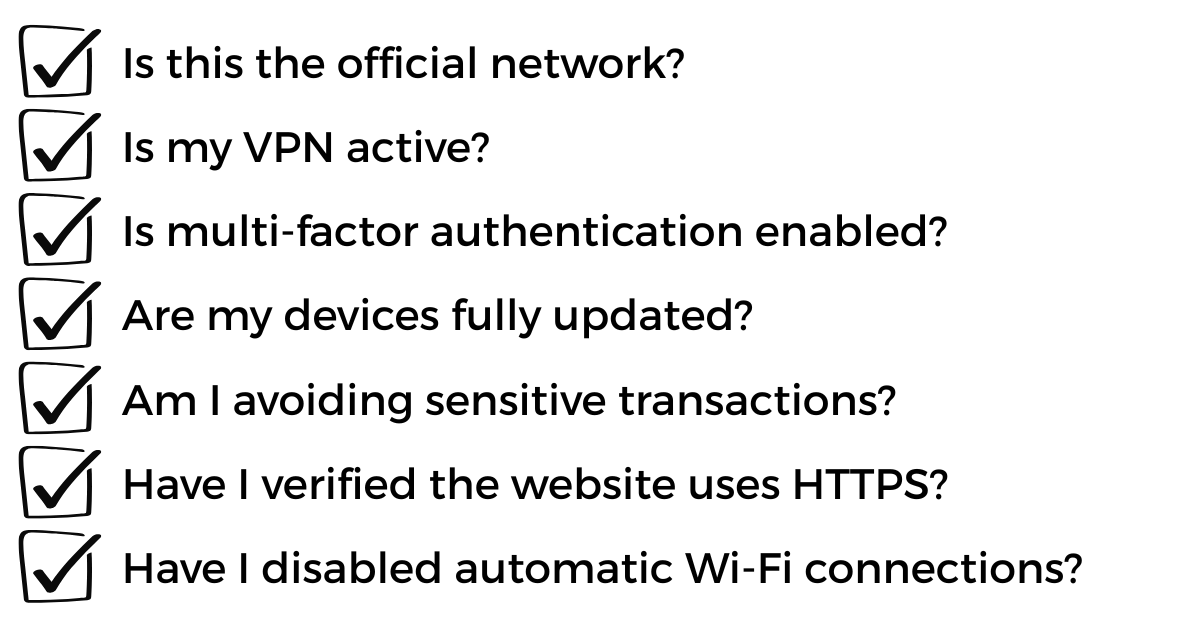
If the answer to any of these questions is no, additional precautions may be needed.
Bottom Line
So, is public Wi-Fi safe for drivers? Not by itself.
While public Wi-Fi provides convenience for truck drivers and transportation companies, it also introduces cybersecurity risks that can expose sensitive business information, compromise fleet operations, and create costly disruptions.
For trucking companies in Dallas, Little Rock, and throughout the transportation industry, protecting drivers from cyber threats requires a combination of technology, training, and proactive security practices. VPNs, multi-factor authentication, mobile device management, regular software updates, and cybersecurity awareness training can significantly reduce the risks associated with public Wi-Fi use.
As transportation operations become increasingly connected, organizations that prioritize cybersecurity will be better positioned to protect their fleets, maintain customer trust, meet compliance requirements, and keep deliveries moving safely and efficiently.
PCA Technology Solutions is a Managed Security Services Provider (MSSP) and IT services company with more than 30 years of experience helping businesses strengthen their cybersecurity posture. From managed detection and response to co-managed IT services and cybersecurity consulting, PCA supports organizations across healthcare, manufacturing, transportation, legal, finance, and professional services throughout Arkansas and Dallas.
Concerned about how public Wi-Fi and other cyber threats could impact your drivers and fleet operations? Contact PCA Technology Solutions today for a cybersecurity assessment and discover how our managed security services can help protect your business, drivers, and critical data, wherever the road takes them.

David Witt
Client Solutions Manager
A seasoned IT professional with nearly a decade of experience at PCA, David started as a network engineer before transitioning into client-facing roles. David is dedicated to fostering strong relationships and delivering exceptional IT services. As a Client Solutions Manager, he leads a team dedicated to providing world-class client support.
David is a proud family man and enjoys spending time outdoors, serving his community, and cheering on the Kansas City Chiefs.

Udemy Breach: What Leaders Must Learn Now
More than simply another cybersecurity story, the Udemy breach serves as a harsh warning that ransomware and data extortion have become serious economic risks. The cybercriminal group ShinyHunters claimed in April 2026 that it had stolen over a million user records...

SOC Goals, SIEM-ply Smarter, and Let Your Defenses SOAR: Your Upgrade to Modern, Unified Defense.
Details Strengthen Your Security with SOC, SIEM & SOAR Join us as we dive deep on the security features of Adlumin and understand what it is in for your organization. Cyber threats are becoming more advanced and responding effectively requires more than...

Why Smart Businesses Are Embracing AI and VoIP Right Now
Businesses' perspectives on communication are being drastically transformed by artificial intelligence today. And one of the most talked-about breakthroughs is the AI receptionist, a system designed to answer calls, respond to customer inquiries, and support front...